
MANUAL ENTRY
Information you enter yourself
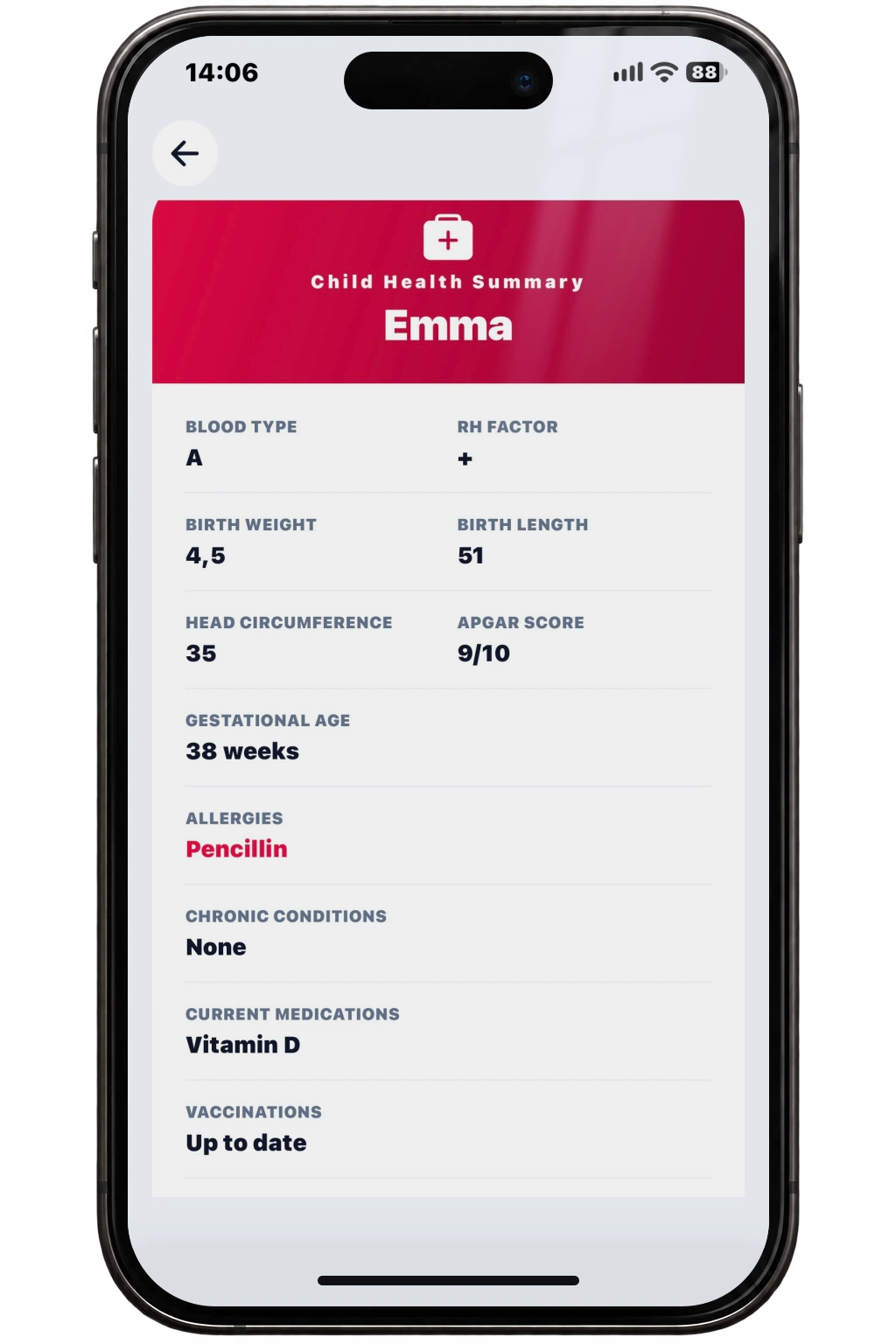
From blood type and Rh factor to medications, vaccinations, and important notes, only the information you enter becomes part of the summary.
Keep the health information you enter for your baby in one place, from birth details to allergies, medications, contacts, and insurance information.



These questions often come up at appointments. Health Passport lets you check the medicines and allergies you have recorded and look up your baby’s birth details.
See how it looks in the appFrom blood type and Rh factor to medications, vaccinations, and important notes, only the information you enter becomes part of the summary.
Allergies entered in Health Passport are combined with foods marked as a reaction in Allergen Tracker, without repeating the same name twice.
The app can create a PDF health summary. Before sharing, it shows a warning because the document contains sensitive information.

Keep the birth details and update the information that changes.
birth details · medication · contacts
Trusted information, expert advice and practical guides to caring for your child and supporting their health and development.

You may need a detail you cannot recall off the top of your head. Look up a medicine name, insurance number or your pediatrician’s contact details in your saved entries, even when you are away from home. If you need to send the information to someone, create a PDF summary, review it and choose who to share it with.
Add only the information you want to save. The app then organizes it into one personal health summary for your baby.
From blood type and birth details to pediatrician, emergency contact, insurance, and your own notes, you choose what becomes part of the record.
Baby Genesis displays information entered by the parent or caregiver. It does not verify the data with a healthcare provider, confirm laboratory results, or make diagnoses.
The summary combines manually entered allergies with foods marked as a reaction in Allergen Tracker, while showing the same name only once.
You can record birth weight and length, head circumference, gestational age, and Apgar without mixing them with later health notes.
Before generating and sharing the document, the app warns that it contains sensitive health information about your child.
When medications, allergies, pediatrician details, contacts, insurance, or vaccinations change, you can update them before you need the summary.

Edit the medication details whenever treatment changes. Update phone numbers, doctor details and insurance information when needed, too. The next time you open the summary, you will not have to work out which entries are out of date.
Check that the information is correct and up to date. The PDF contains your child’s health details, so share it only with the person you intend to give that information to.